Cloud Review & Sync for Rhino & SketchUp Models
Sync, section, measure, and annotate Rhino (.3dm) and SketchUp (.skp) 3D models in real-time. Free in public beta with zero desktop installs, direct cloud streaming, and instant collaboration.
 ● 3D Viewer Live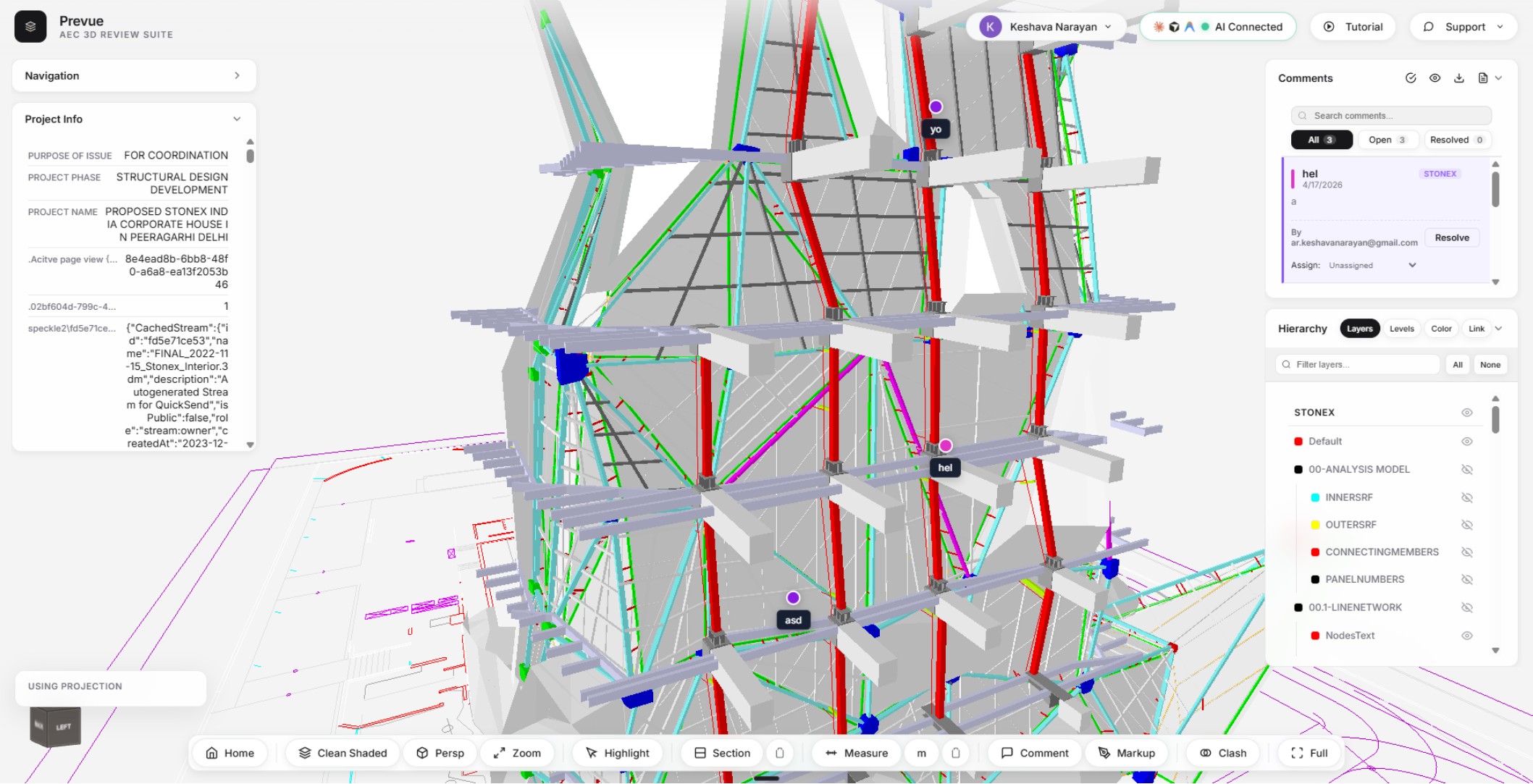
BIM Review Engineered for the Web
Load massive 3D geometry directly in your browser with high-fidelity visual styles, dynamic sectioning, and live spatial annotations.
Multi-Format 3D Engine
Open native Rhino (.3dm) and SketchUp (.skp) models directly in your browser with instant geometry loading and smooth orbiting.
Direct Cloud Streaming
Connect and review models directly from Zoho Workdrive and Google Drive links without downloading heavy files to your machine.
Interactive Sectioning
Place dynamic cross-section planes with capped solid cuts to inspect interior structural framing, MEP layouts, and floor plans.
3D Spatial Comments
Pin notes and feedback directly to specific 3D elements to resolve design questions and coordinate with team members in real-time.
Direct Cloud Storage Streaming
Connect your collaborative workspaces to stream, review, and annotate 3D models with zero local downloads.
Google Drive
Paste any shareable Google Drive link to review models instantly in your browser without local downloads.
Zoho WorkDrive
Stream architectural 3D assets securely from Zoho WorkDrive folders and collaborative team spaces.
SharePoint & OneDrive
Enterprise model streaming and automatic synchronisation directly from Microsoft SharePoint document libraries and OneDrive.
All third-party trademarks and brand logos (including Google Drive, Zoho WorkDrive, Microsoft SharePoint, and OneDrive) are the intellectual property of their respective owners. Mention and display of third-party marks are strictly for reference, file compatibility, and cloud integration purposes.
Talk Directly to Your 3D Models
Connect Claude, ChatGPT, Gemini, or your preferred AI assistant to query geometry, filter layers, and check clashes using natural language.
All trademarks, product names, and brand marks (including Claude, ChatGPT, Gemini, OpenRouter, Ollama, Groq, Cursor, Rhino, and SketchUp) are the property of their respective owners. Mention of these names is strictly for compatibility and API integration reference and does not imply endorsement or affiliation.
Fast CAD & BIM Model Reviews
Eliminate expensive desktop software licenses for reviewers. Share interactive models with clients, consultants, and contractors in seconds.
Multi-Model Overlay & Linking
Link and overlay architectural, structural, and facade models into a single coordinate space with automatic unit conversions.
Geographic Real-World Placement
Position models accurately onto satellite maps with address search, true north orientation, and elevation controls.
Multiple Visual Styles
Switch between clear visual modes including Shaded color, Arctic ambient shadow, Technical Hidden Line, and semi-transparent X-Ray.
Layer Tree & Property Inspector
Browse complete model layer hierarchies, toggle element visibility on demand, and inspect object metadata with one click.
Precision 3D Snapping & Measurements
Measure exact point-to-point distances across model geometry in metric (m, mm) or imperial (ft, in) units.
Team Sharing & Access Control
Invite collaborators via email, control review permissions, and access saved projects securely from any device.
Keyboard & Navigation Shortcuts
Navigate complex 3D scenes effortlessly with standardized viewport hotkeys.
| Shortcut | Action | Description |
|---|---|---|
| Alt + H | Home / Model Selector | Return to the project dashboard and cloud model loader. |
| D | Visual Style Toggle | Cycle between Shaded, Arctic, X-Ray, and Hidden Line modes. |
| C | Section Plane | Double-click geometry to drop a dynamic cross-section clipping plane. |
| M | Measure Distance | Click any two points in 3D space to measure precise real-world length. |
| K | Add 3D Comment Pin | Click a surface point to pin a discussion note to the model. |
| L | Toggle Comment Visibility | Show or hide all 3D comment pins and annotations in the viewport. |
| G | Toggle Geographic Map | Open the real-world satellite map and location panel. |
| Z / E | Zoom Extents | Frame and center all loaded 3D models within view. |
| F | Focus Selection | Zoom camera directly onto the currently selected object. |
| Esc | Deselect All / Reset | Clear current selection and close active inspection tools. |
Start Reviewing in 3 Simple Steps
No installation, plugins, or software activation required. Jump right into your browser.
Open Prevue in Chrome, Edge, or Firefox
Navigate to the web app in any modern browser. Sign in with Google to enable cloud sync and project saving.
Load Local File or Cloud Link
Drag-and-drop a local .3dm or .skp file for an instant temporary session, or paste a Zoho Workdrive / Google Drive URL.
Inspect, Section, and Collaborate
Take measurements, cut section planes, pin comments, and invite team members to review 3D details collaboratively.